2017/08/20

Get custom status bar without jailbreak in iOS 11 on iPhone/iPad

Good news for all non-jailbroken iOS users, you can now customize and can get custom status bar on your iPhone/iPad in iOS 11 without jailbreak. You could get custom status bar on your iOS devices only when your device is jailbroken.

But iDeviceHelp show up a great idea to get some custom icon right on status bar on his Youtube channel running iOS 11/10 and 9.

Good news for all non-jailbroken iOS users, you can now customize and can get custom status bar on your iPhone/iPad in iOS 11 without jailbreak
With Polarr Photo Editor app you can do all things like you would do in a tweak Zepplin on Jailbroken devices. With Polar Photo editor you can do things like add text, logo, icons and many more.

Polarr Photo Editor can be download through App Store for free and is compatible with iOS 11/10 and 9.

Take a look at video on How to Customize Status Bar without jailbreak in iOS 11;


You can use some of the Customized wallpapers as custom status bar;
Must Read:How to clear app cache on iPhone ? Sponsor ads:
Gihosoft iPhone Data Recovery Free


Please share if you like it.....

2017/07/28

iOS 11 beta 4 reveals one of the cool features for iPhone and iPad users

Apple has launched the latest version of their mobile OS, iOS 11 and the new operating system has many new and improved features. A lot of people have been enjoying the new features available in iOS 11 on the beta version of the OS.


A couple of days back Apple has launched the 4th beta version of their new mobile OS. There are many improvements in the latest version of beta. But the new version of OS shows one of the features that has made its way into iOS 11 without any major announcement or fanfare but it should come as welcome news to iPhone owners.

A new version of the OS will take away one of the biggest headaches of iPhone and iPad users. With iOS 11 the App Store will finally feature “pull to refresh” functionality now in the “Updates” tab. Yes, this isn’t exactly a groundbreaking, life-changing feature. You won’t see any sleek iOS 11 pull to refresh commercials coming to your television anytime soon. Still, it's minor features and tweaks like this that make iOS feel more and more polished every single day.

Of course, Android users have enjoyed pull to refresh functionality for quite some time. Apple has slowly been catching up with many official apps and third-party apps working the feature in. Now that the App Store includes pulling to refresh, users will be able to see and feel a little more consistency between apps. Fragmenting in design and functionality is often what makes a mobile OS feel poorly designed so even small features like this can make a huge difference.

Of course, iOS 11 pull to refresh in the App Store is not even close to the number one best feature in iOS 11. Apple’s newest OS build has given users more great features to play with on their devices including control center customization, improved Apple Maps functionality, a redesigned App Store, improvements to Siri including translation abilities, and much, much more. If you’re thinking of jumping into iOS 11 or have just pulled the trigger, check out our iOS 11 tips and tricks to get you going.Sponsor ads:
Gihosoft iPhone Data Recovery Free


The latest discovery of iOS 11 pull to refresh in the App Store is not exactly headline news but it is fun to find new features that have been quietly introduced. Have you noticed any iOS 11 features that Apple didn’t give a lot of stage time for? Let us know!

6 iOS 10 hidden features which will make fall in love with it

iOS 10 is getting the good response from the users, according to statistics compiled by research firm Mixpanel, iOS 10 adoptions are tracking at 55.29 percent as of Friday, while iOS 9 stands at 43.8 percent. Older iOS version distribution fell to 4.71 percent.

Sponsor ads:
Gihosoft iPhone Data Recovery Free

The fresh metrics come two days after iOS 10 passed its predecessor for a majority share of compatible devices.

So if you are one of them who got the new version of the iOS then this article will help you get maximum out of your device, as we are going to talk about some of the hidden features of iOS 10. So let’s start.


More tabs when browsing

Finally! iPhone fans no longer have to open multiple windows on Safari when searching the internet.

First, rotate your phone horizontally and tap the tabs button in the top right of your device.
A new search box will then appear in top left of your phone, where you’re able to search for another topic.

When you have typed in the keywords of your choice, you can open the new tab by tapping the screen.

There’s a cool new stopwatch

So if you are bored of your bog-standard phone timer, then iOS 10 has unleashed a far swankier option to bring more cheer for you.

There are three quick steps to activate the feature:
  • Open up your clock
  • Select the Stopwatch
  • Swipe left


Prioritise apps for download

A common iPhone gripe is that you can’t choose which apps to download first when updating your phone.

This may mean that you end up waiting for ages to open up a feature that you’re itching to use.
To prioritise which apps are ready first, tap and hold down the app icon.

Selecting the Prioritise Download option will then put it to the front of the queue.

Auto-download albums added to Apple Music

Prior to iOS 10, the process for adding and then downloading a new album or song to your iOS device involved tapping on the "+" icon to add it to your account, then manually downloading it.

As of iOS 10, you can set your device to download any content added to your Apple Music account just by tapping on the "+Add" button. Enabling the feature is simple, just go to Settings > Music > Downloadsand sliding the switch next to Automatic downloads to the on position.

Automatically manage music storage

With iOS 10, you can save space on your iOS device by letting your iPhone or iPad automatically manage music that's downloaded to your device. Go to Settings > Music > Downloads.

There you can manage songs and albums stored on your device yourself under the "Downloaded Music" section, or you can set an amount of storage you want to constantly keep on your iOS device. If you get low on storage, iOS will evaluate your downloaded music for songs you rarely listen to and remove them automatically. 


New Features in Apple Mail

Fast Unsubscribe: emails with unsubscribe links will now automatically have them displayed at the top of each message with an easy to hit the button.

Unread Only: when viewing your mailbox, look for the filter icon (bottom left corner) and change the default setting to ‘Filtered by Unread’


Quick Actions: Swipe left on a message in the new threaded view and it will reveal quick actions such as the flag, reply and trash.

2017/04/10

How do I download a private video on Facebook to my iPhone?

Unlike other webpage video extracting tools, Dimo Video Converter Ultimate is a standalone HD anime video downloader (360p/720p/1080) that permanently works with websites like YouTube 300+ torrent sites, it downloads by URL without doing harm to your computer. Then, you could convert the download video to iPhone profile to avoid the videos on iPhone playback issues:

With URL of videos, downloading video to iPhone is so simple, you could refer this post here: Free Download Movies to Galaxy S8

2017/04/07

iOS 10.3 Features – What Mobile Marketers Need to Know

Today Apple released an update to iOS, version 10.3. This new version contains a couple of really interesting capabilities to help your mobile marketing. If you missed it, we recapped these new features in a recent post all about iOS 10.3 and announced the latest in our press release.
Now that the release is live, we’re excited to announce that Leanplum is ready on day one to help you take advantage of the release.


Sponsor ads:
Gihosoft iPhone Data Recovery Free
So now that it’s out, what can you do with iOS 10.3?

Built-In App Reviews

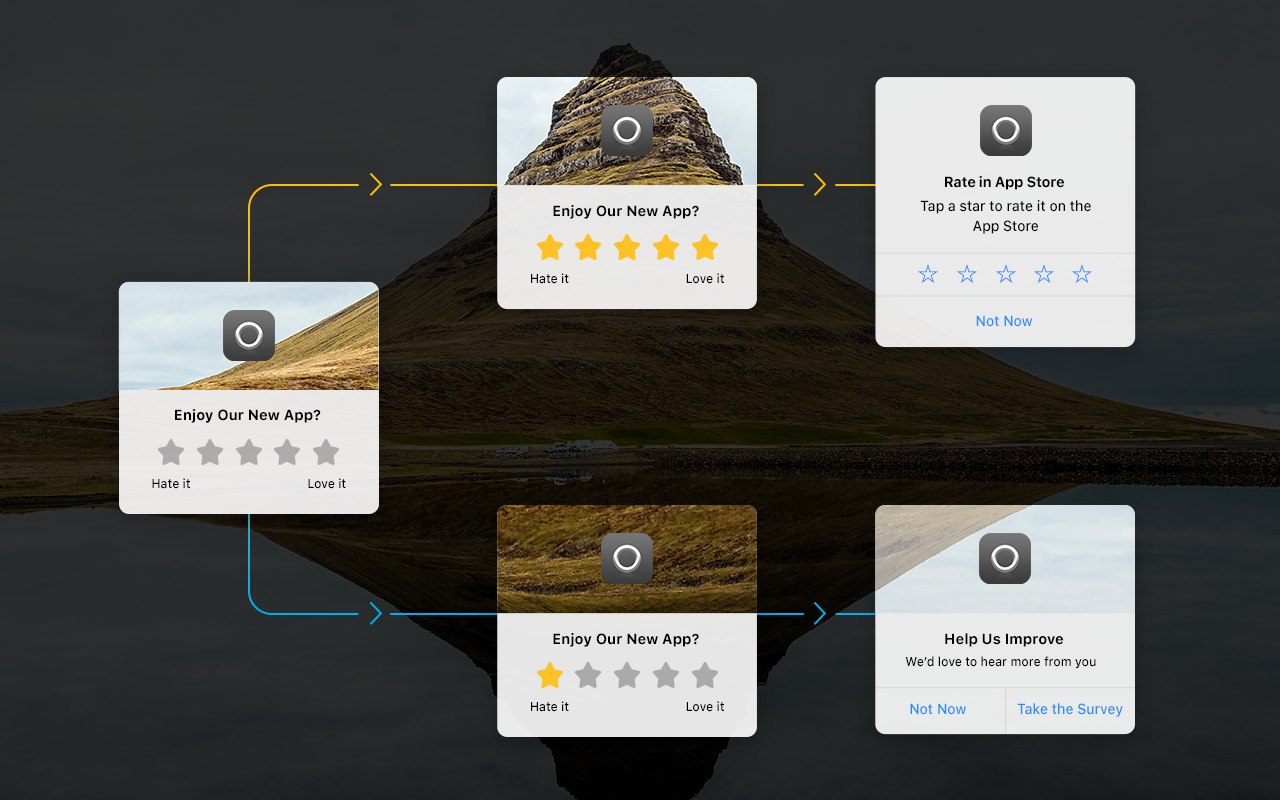
Apple is rolling out a new way to review apps in the app store. For years we’ve helped marketers improve their app reviews. Many of our customers have built campaigns to engage their most active users, ask them for reviews, and deep link to the app store. The results have been impressive. Leanplum has helped apps improve their average app store ratings between ½ – 1 additional star.
iOS 10.3 changes how this is done, in some ways making it much easier but also requiring a softer touch. Instead of sending users to the app store, Apple now lets you enter a review directly in the app. This vastly improves the user experience and should make review campaigns even more effective.
On the flip side, Apple is now restricting use of its new App Reviews API, which underpins this new capability, to not more than three times per app per year. With that restriction, it’s even more essential that marketers carefully consider the right time to ask for a review and A/B test different approaches. Otherwise, they may lose the right to ask again.

leanplum-ios-103-app-review

Dynamic App Icons

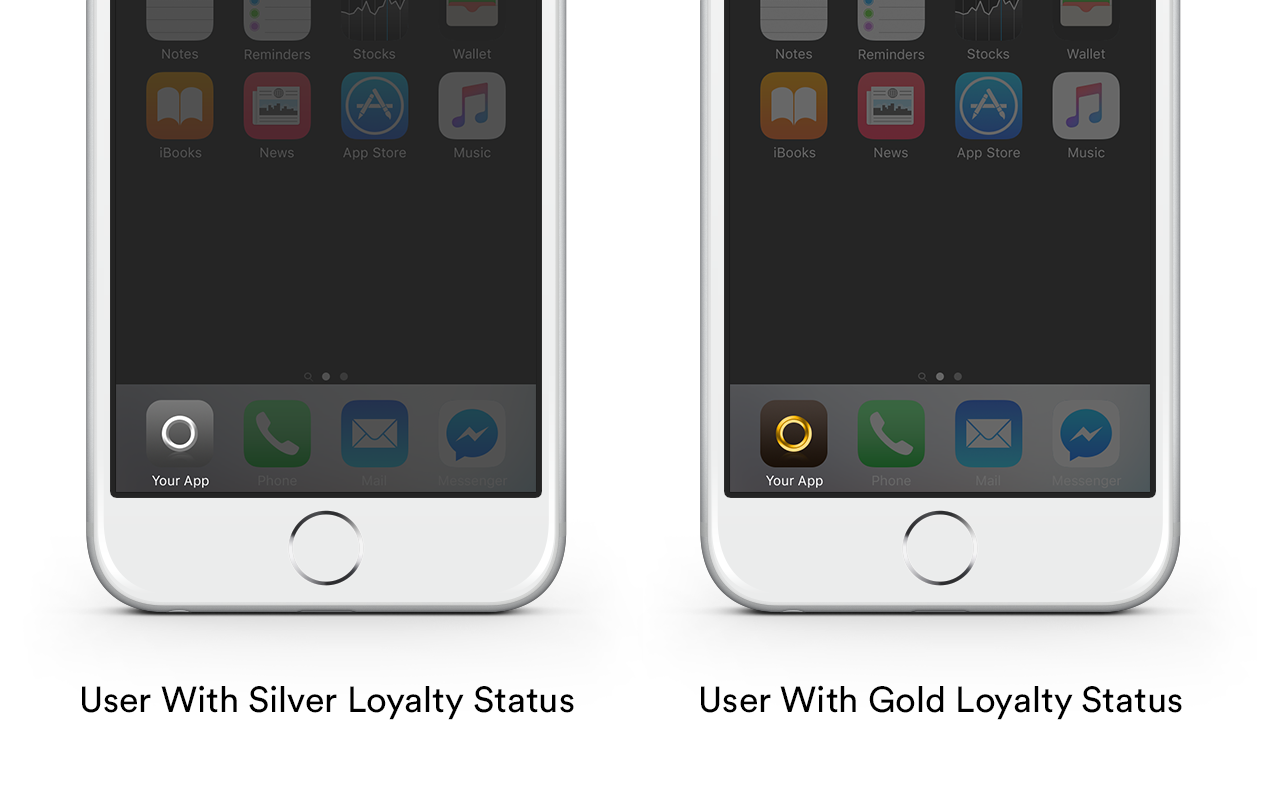
Apple has also provided a new way for apps to dynamically change their app icon. There are a few reasons a marketer might want to do this. The most significant is personalizing the app.  For example, a sports app could change its icon to match a user’s favorite team or a travel app could change its icon to match a user’s loyalty status. The possibilities are endless.
We’re happy to provide the platform that enables mobile marketers to personalize the user experience and A/B test the right way to engage those users. Leanplum also helps mobile marketers determine if maintaining multiple app icons generates more engagement or makes the app less recognizable.
With support for dynamic app icons, marketers have one more solution in their user engagement arsenal.

leanplum-ios-103-app-icon-personalization

Ready on Day One for iOS 10.3

The pace of innovation in mobile marketing is fast. We’re happy to say we support these key new marketing capabilities for iOS 10.3 on day one. Those who adopt capabilities and approaches when they are new stand out from the crowd.

iOS 10.2 fix the iPhone 6s battery drain problems?

iOS 10.2 fix the iPhone 6s battery drain problems?


iOS 10.2 Features and Updates: What’s New
For a point-one update, iOS 10.2 is jam packed with some interesting, some amusing and some very useful features.Check out everything that’s new in the iOS 10.2 update below.
1. Over 70 New Emojis
2. New Wallpapers for iPhone 7 and iPhone 7 Plus
3. SOS Feature for iPhone
For the iPhone, you need to click the power button 5 times to engage the feature. The service is currently under testing and is only available in India.
4. New Now Playing Splash Screen
5. Redesigned Shuffle and Repeat Buttons
6. TV App Replaces Video App
7. You Can Get Video App Back from the App Store
8. New TV and Videos Widget
9. Enable Single Sign-On
10. Notification Center Remembers Where You Left Off
11. Hiding Contact Photo in Messages Actually Works
12. Quick Response Doesn’t Lose Text When Switching To App
In iOS 10.2, if you’re tying a response to a message in quick response, and you choose to open the app, the text you’ve already written will no longer be lost.
13. New Full Screen Effects: Celebration and Love
14. Disable Press and Hold Home Button To Speak
You’ll find a new option in for “Home button” settings in “Accessibility“. From the “Press and Hold Home Button to Speak” section you can switch from Siri to plain old Voice Control or just turn the feature off altogether.
15. New Siri Splash Screen
If you turn off Siri, the next time you press and hold the Home button, you’ll get a new splash screen giving you information about Siri and giving you options to turn it back on again.
16. Sort Playlist
17. Star Ratings in Music App Are Back
iOS 10 replaced star ratings with the Heart button. But now, thanks to the revolt by Star rating fans, they’re back. You’ll find them in the options menu, when you tap the three dotted menu or when you 3D Touch a song item.
18. Preserve Camera Settings


Sponsor ads:
Jihosoft  iPhone Data Recovery
Free iPhone Data Recovery Software for Windows/Mac
Recover up to 12+ types of files, including contacts, SMS, photos, WhatsApp, Viber, notes, etc.
Restore lost data from iOS devices directly or from iTunes and iCloud backup
Recover iPhone data lost due to iOS upgrade/jailbreak, accidental deletion, device lost or broken
Support all the latest iPhone, iPad and iPod Touch.
Tips:

Gihosoft iPhone Data Recovery Free

Is the iOS 10.3 still draining our batteries?

Is the iOS 10.3 still draining our batteries? I just noticed that ios 10.3 , despite the claims of a battery fix, still has an unbelievably act of draining phone batteries (iphone 6s in my case). Am I the only one getting this problem? my iphone is not included in the iphone 6s battery replacement program.


Sponsor ads:
Gihosoft iPhone Data Recovery Free

This is a very handy iOS “FixIt” site, so you should book mark it, 1st.
Battery Hog App - Delete the Top app’s that are draining your battery + some other steps with them as well.
Follow each step (you may want to Print too), as every recommended Step is important. It should work on 10.3 too.
How to Fix iOS 10 - iOS 10.2.1 Battery Life Problems
Battery - If, this doesn’t work, then you may very well just need a new Battery Replacement, and there are lot’s of 3rd-party, certified shops.
Source:https://www.imyfone.com/ios-10/ios-10-upgrade-tips/